Success Case: Resolving PayPal v2 Integration Issues for Guest and Logged-In Customers

A customer faced an unusual issue with the PayPal v2 module in osCommerce v4.14. While PayPal buttons displayed correctly for guest users, they did not appear for logged-in customers during checkout. Additionally, imported customers from a previous osCommerce version were assigned to the "Main" group by default, causing configuration conflicts. The customer also sought assistance on adjusting button displays and changing checkout button wording.

Solution Provided by osCommerce Support:

1. PayPal Buttons Not Showing for Logged-In Customers:

The support team identified that the option "Disable PayPal for guests if only virtual products in cart" caused the issue, especially for users in the Main group.
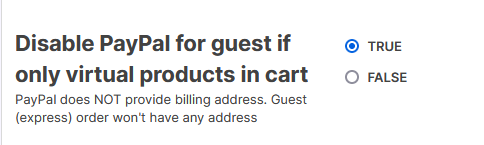
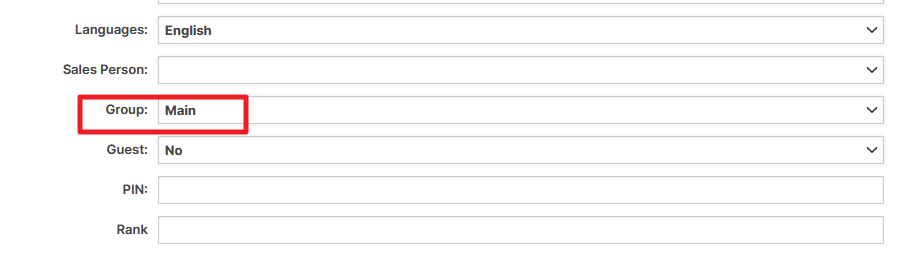
 

Solution: Assign customers to the Basic group. A simple SQL command was provided to mass-update customer groups: UPDATE customers SET groups_id = 1

2. Adjusting PayPal Button Display in the Shopping Cart:

  • To display only the "Pay with Card" button on the Shopping Cart page and hide other PayPal options:
    • Navigate to Payment > Online > Settings and set "Show PayPal button(s) on Shopping Cart" to False.
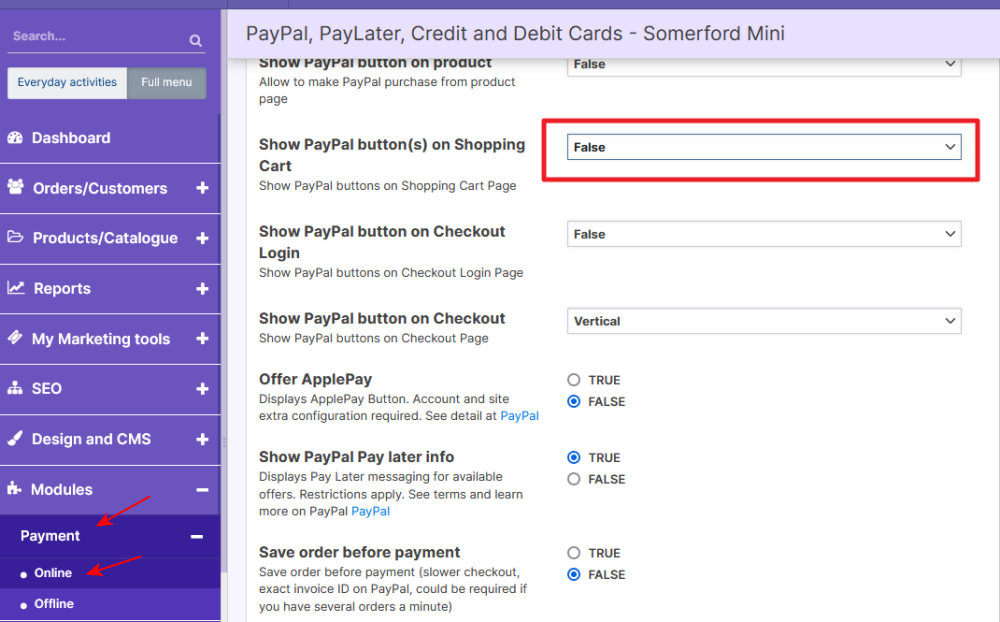
3. Customizing Checkout Button Wording:

  • To change the button text from “Pay With Card” to “Go To Checkout”:
    • Go to Design and CMS > Translation, search for the key TEXT_PAY_WITH_CARD, and edit it to the desired wording.
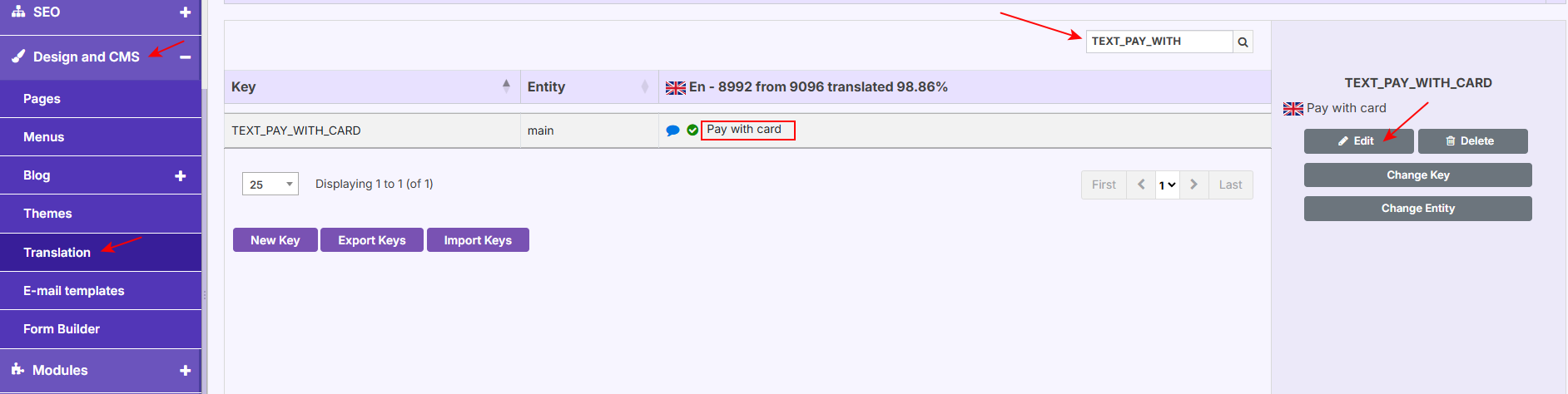
With osCommerce support’s step-by-step solutions, the customer successfully resolved all issues, ensuring seamless PayPal integration for both guest and logged-in customers, refined the Shopping Cart display, and customized the button wording to meet their preferences.

osCommerce’s flexibility and precise troubleshooting empower store owners to resolve complex issues efficiently, ensuring an optimized checkout experience for customers.

Tags
Ecommerce osCommerce 4.x Multiple sales channels Managing SEO Order Statuses Cron Scheduler osCommerce v4 Theme Customization PHP Compatibility Module Installation Free Shipping Customer Groups Theme Designer Cron Jobs Order Management Design Troubleshooting Checkout Page Responsive Design Language Settings Multilingual Store Translation Module German Language Multilingual Support PayPal Integration Shopping Cart Display Payment Module Configuration SQL Commands Customizing Buttons Payment Options German Translation Frontend Localization Enable Languages System Translate Module Shipping Configuration Zone Table Rate Shipping Weight and Price Restriction Shipping Module Setup Shipping Price Cutoff Shipping Compensation Limits Customer Details Validation Custom Validation Rules Mandatory Fields Setup Address Validation Minimum/Maximum Values Settings Order Status Notifications Email Templates Setup Customer Communication Automated Notifications Product Listing Image Display UpSell Module Widget Settings Cash On Delivery Prepayment Payment Via Invoice Click And Collect Shop Local Plugin Customization Address Configuration Promotions Tailored Offers Shipping Options Custom Promotions Automated Imports CSV Import XML Import Extension Generator Custom Extensions Backend Controller Development Tools Product Export Data Management Database Export Supplier Data Custom Exports Pricing Automation Supplier Pricing Retail Pricing Inventory Management Automated Workflows Database Update Customer Data Data Migration Ecommerce Security Admin Directory File Permissions Database Migration Secure Admin Access Ecommerce Migration Security Key 404 Error Fix Web Server Setup Website Upgrade Data Import Admin Error Fix Internal Server Error Tech Support Import Process XML Fix Database Management PHP8 Web Development Dev Support PHP Errors Software Upgrade URL Rewriting Website Optimization SQL Search Ranking Migration oscb156 PHP Secure Key Dev Solutions User Feedback Software Solutions Ecommerce Design Checkout Customization Order Confirmation Guest Checkout Invoice Link Checkout Optimization Shipping Details Banner Optimization UX Website Customization Image Management Web Design Category Display Store Customization Navigation Empty Categories Troubleshooting Website Icons Product Filter Product Management Active Status Products Product Video eCommerce UX Video Integration Privacy Settings Privacy Policy Coding Tips Bulk Update Paging Widget UX Improvement Website Navigation Batch Processing Store Optimization Website Fix User Experience Bug Fix Product Display Thumbnails Accessibility Best Sellers Inclusive Design Mobile Friendly Online Store Product Sorting Theme Settings Fixed Width Digital Launch ux design b2b b2c osCommerce UI Multi Store Management eCommerce Solutions Digital Transformation osCommerce 4 business growth HolbiGroup Innovation AI in Ecommerce Global Business Website Translations Local SEO